Feature

Cloud Kitchen & Ghost Kitchen Software
Delivery platform orders on one screen, auto-accept, kitchen display, stock and per-platform reports

RoxPos cloud kitchen software: delivery platform orders on one screen, auto-accept, kitchen display, stock deduction per order and per-platform reports.

Cloud Kitchen & Ghost Kitchen Software

Key Highlights

Every platform's orders on one screen

In Ireland and the UK, Flipdish orders land in the same list as your other orders; a new order is announced with its own sound in the web panel and arrives on the mobile app as a notification with the platform name. Scheduled orders wait in their own tab.

Several brands from one kitchen

Connect several accounts on the same delivery platform and tell them apart in the order list by their display names, so every virtual brand runs from the same screen and the same kitchen.

Auto-accept and kitchen tickets

With auto-accept on, orders are accepted as they arrive where the platform allows acceptance from the POS, and the ticket prints on the kitchen printer you choose. The automation runs on the server, so an order is never accepted or printed twice.

On the kitchen display (KDS) with the platform name

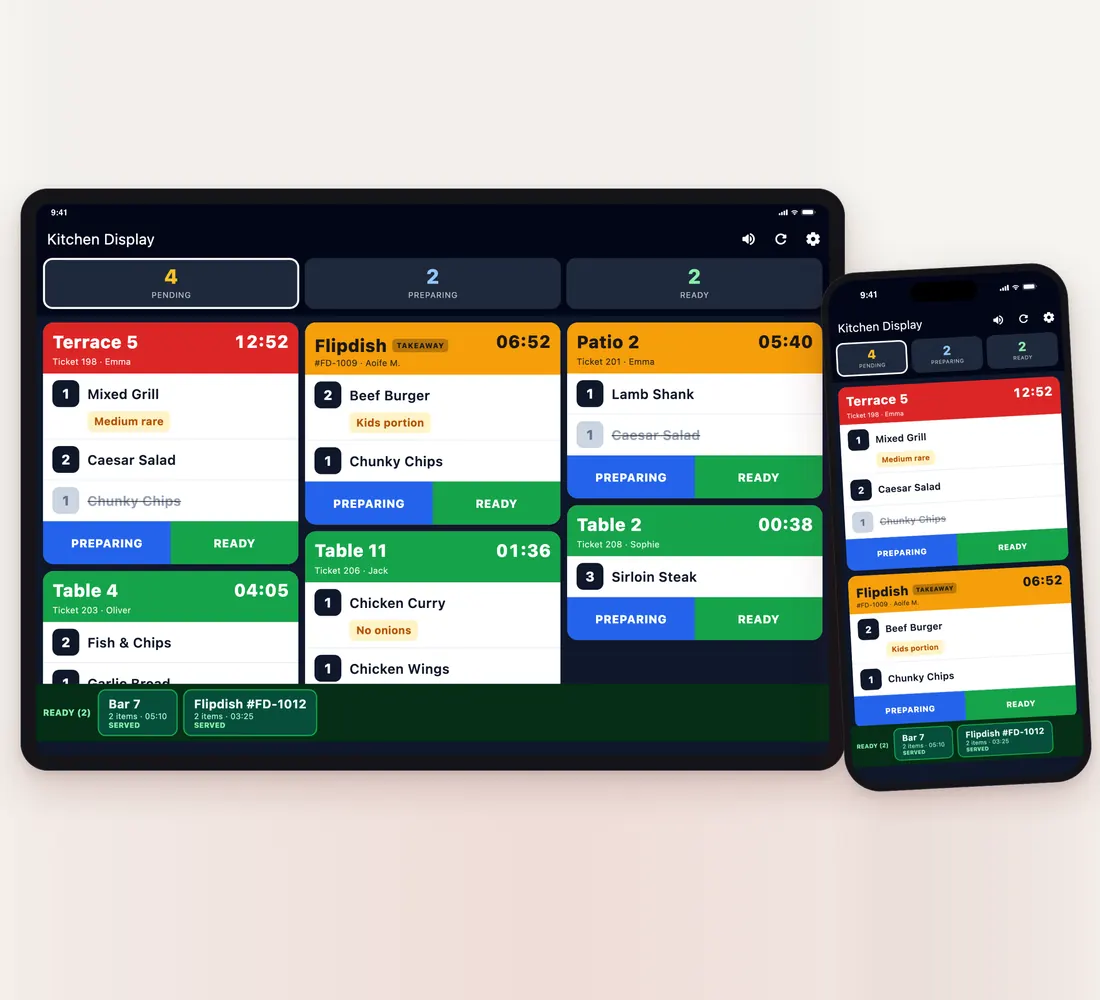
Online orders appear on the kitchen display with the platform name and a takeaway label; preparing and ready states and waiting times are colour-coded. The display opens in a browser, on a tablet or on a phone and works alongside kitchen printers.

What Is It For?

Stock and recipe deduction on platform orders

On the product mapping screen, platform items are linked to RoxPos products per integration. When an order is accepted, stock, or recipe ingredients when a recipe is defined, is deducted, and returned if the order is cancelled or rejected.

Switching items off at critical stock

With stock automation on, an item that falls below its critical level is switched off automatically on Flipdish.

Closing the restaurant when it gets busy

From the restaurant status window you close and reopen the restaurant on Flipdish when the kitchen can't keep up.

Per-platform reports and commission

The online orders report shows order count, revenue, commission and net after commission, delivery and cancellation rates and the average basket, with daily and hourly distribution and a breakdown by platform. Commission uses the rate you enter for each integration.

Related Solutions

Frequently Asked Questions

Which delivery platforms can I connect?

In Ireland and the UK: Flipdish. Available platforms vary by country; for other countries, contact us about the platforms you use.

Can I run several brands from the same kitchen?

Yes. Connect several accounts on the same platform and give each a display name; the order list shows which brand an order came from. If the display name is empty, the branch name is shown.

How do orders reach the kitchen?

An accepted order prints on the kitchen printer you choose and appears on the kitchen display (KDS) with the platform name and a takeaway label. The display opens in a browser, on a tablet or on a phone.

Does stock go down with platform orders?

Yes. Once platform items are mapped to RoxPos products, stock or recipe ingredients are deducted when an order is accepted and returned if it is cancelled or rejected.

Can I see platform commission and net revenue?

Yes. Enter the commission rate from your contract for each integration; the online orders report shows commission, net after commission and the breakdown by platform.